

Losing a potential client to phone tag is more than frustrating—it's a direct hit to your firm's revenue. A clunky, slow intake process gives good leads every reason to call your competition. Your legal client intake form must be your hardest-working tool, converting interested people into retained clients, not creating friction that sends them away.
Why Your Intake Process Is Costing You Clients

Every hour your team spends on manual data entry, chasing a signature, or following up on a payment is an hour of lost billable time. Worse, these delays create the perfect opening for another firm to swoop in. When someone needs a lawyer, their urgency is high and their patience is low.
The numbers don't lie. A recent law firm client intake survey found that 56.8% of leads come from contact forms and emails, yet many firms struggle to respond quickly. Speed is everything. If your intake conversion rate is stuck between the typical 30% and 50%, it's time to eliminate every point of friction that causes a promising lead to go cold.
The Real Cost of a Manual Workflow
Your clunky intake process is a genuine threat to profitability. Think about the hidden costs piling up from an outdated system:
- Lost Revenue: Every lead who gives up because your process is too slow is potential revenue walking out the door.
- Wasted Staff Hours: Your team burns non-billable hours on administrative tasks—data entry, scanning, and endless follow-up calls.
- Poor Client Experience: A frustrating first impression kills your chance of getting future referrals from that person.
The core problem is a fragmented process. Separate tools for forms, signatures, and payments give prospects too many chances to quit. You need one link that handles everything.
Fixing your intake has a direct impact on your bottom line. Automating this workflow doesn't just save time; it builds a predictable engine for growth. By automatically feeding client data into a CRM for your law firm, you can track and improve those crucial conversion rates over time.
How to Build a Better Legal Client Intake Form
Your legal client intake form is the first real interaction a potential client has with your firm. Get it wrong, and it feels like an interrogation. Get it right, and it feels like a helpful, guided conversation that builds immediate trust.
A great intake form does two things: it captures the essential information you need for a conflict check and basic case assessment. And it does this without overwhelming an already stressed person.
The Core Four: Fields Every Intake Form Needs
Before you ask practice-specific questions, your form must capture four universal pieces of information. It's shocking how many firms fumble this. A 2024 Legal Industry Report found that 86% of firms fail to collect an email address and 45% don't get a phone number on initial contact. A digital form solves this by making these fields mandatory.
Here are the must-haves:
- Full Name and Contact Info: Full legal name, a reliable phone number, and an email address. No exceptions.
- Matter Type: A simple dropdown menu (e.g., "Divorce," "Car Accident," "Will Creation") helps you instantly route the lead.
- Opposing Party Information: Collect the full names of any other individuals or companies involved for an immediate conflict check.
- How They Found You: A quick question ("Google Search," "Friend/Family") provides invaluable marketing data.
Tailoring Questions To Your Practice Area
Once the basics are covered, your form should adapt to the client's needs. This is where you use smart, practice-specific questions that show you understand their situation. The key is to ask only what's necessary for the initial consultation.
Your form's job is not to conduct a full client interview. Its job is to collect just enough information to qualify the lead, run a conflict check, and prepare you for a productive first call.
Conditional logic is your best tool here. If a prospect selects "Personal Injury," the form should automatically show questions about the incident date. If they select "Family Law," it asks about marriage dates. This keeps the form short and relevant, boosting completion rates and helping you build scalable law firm operations systems.
A Practical Checklist for Your Form
Use this table to distinguish universal fields from specialized questions. It's a simple starting point for building a form that feels custom-made for your ideal clients.
| Field Category | Essential Fields For All Firms | Practice-Specific Examples (PI, Family Law, etc) |
|---|---|---|
| Client & Contact | Full Legal Name, Phone, Email | Preferred Name/Pronouns, Best Time to Call |
| Matter Details | Type of Legal Matter (Dropdown) | Personal Injury: Date/Location of Accident, Brief Description of Injuries |
| Conflict Check | Full Name(s) of Opposing Party | Family Law: Spouse's Full Name, Date of Marriage/Separation |
| Case Context | Brief, Open-Ended Case Description | Estate Planning: Marital Status, Number of Children |
| Referral Source | How Did You Hear About Us? | N/A |
By focusing on this guided approach, you transform your intake form from a data collection tool into a powerful asset. You get exactly what you need while providing a smooth experience that makes clients feel understood from the first click, leading to faster client conversions.
Going From Intake Form to Retainer in One Step
A form that only collects data is a massive missed opportunity. Your legal client intake form should drive a lead directly to a paid, retained client—before they call another firm. Stop seeing intake as a separate step and start treating it as a single, unified workflow.
This approach embeds critical actions, like signing your fee agreement and paying the retainer, directly into the form itself. You're not just collecting information; you're securing a commitment the moment a lead is ready to act.
Integrate E-Signatures Directly Into Your Form
The gap between finishing an intake form and signing your fee agreement is where most leads are lost. Every extra step and email attachment creates friction. Integrating e-signatures makes the fee agreement the final, logical step of the form.
When a client clicks "submit," they should immediately see your agreement ready for their signature. This capitalizes on their momentum, turning their inquiry into a formal commitment in a single session. By collapsing the form and signature into one action, you shrink the time-to-retainer from days to minutes.
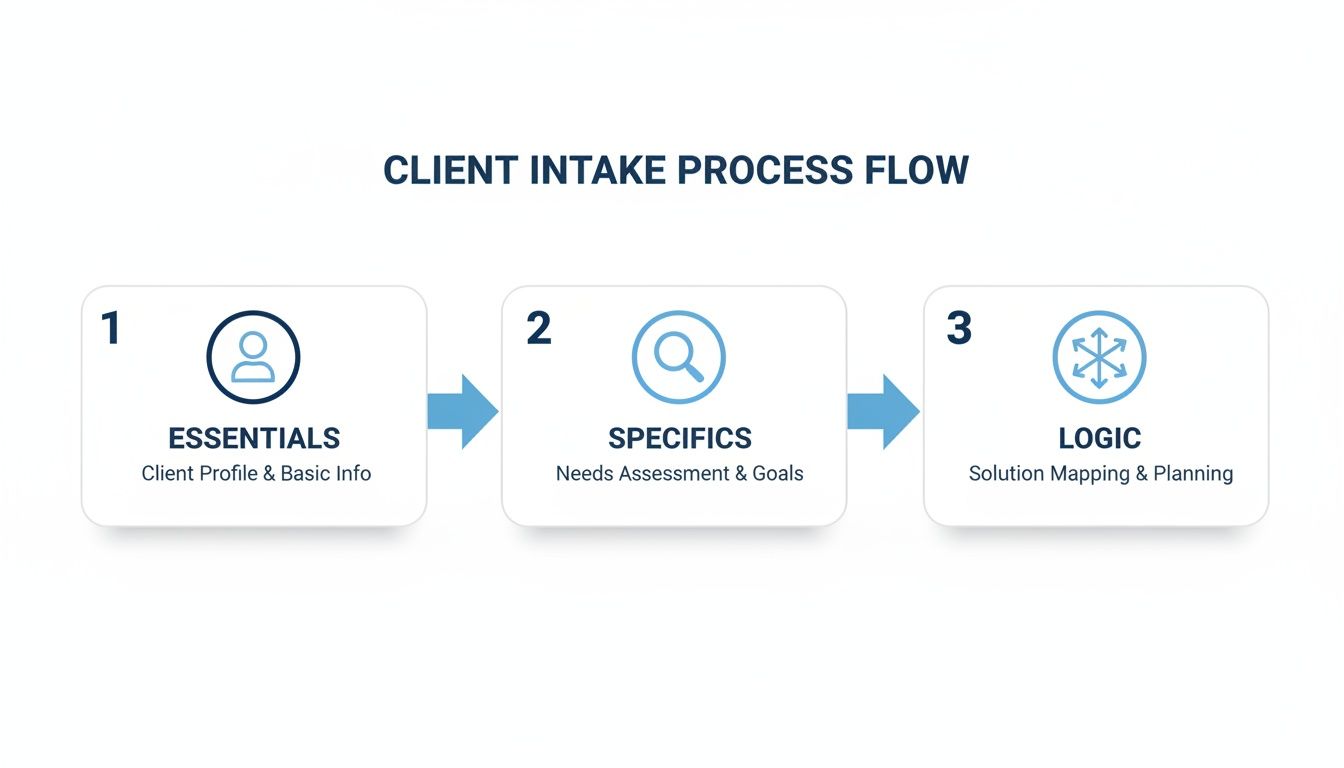
This visual shows the ideal flow: capturing essential client data, drilling down into case-specifics with smart logic, and moving them toward a commitment.
Secure Payments On The Spot
Once the agreement is signed, the next barrier is payment. Asking a new client to mail a check or wait for a separate payment link kills momentum. Connect a payment processor like Stripe directly to your intake workflow.
After signing, the client is immediately prompted to pay their consultation fee or retainer. This accomplishes two critical goals:
- It confirms their commitment. A client who has paid is locked in. It drastically reduces no-shows and solidifies the attorney-client relationship.
- It improves your cash flow. You get paid upfront without chasing invoices, which is a huge operational win.
This integrated system is fundamental to creating better law firm operations systems that scale. It's about re-engineering your process to match modern client expectations.
Why A Unified Workflow Is Non-Negotiable
Combining your legal client intake form, e-signature, and payment into a single link is the most effective way to improve your conversion rate. Firms using disjointed tools—a web form, a separate PDF, and a third link for payment—are creating exit ramps for their leads.
A unified workflow eliminates these risks. The prospect follows one intuitive path from start to finish without ever leaving the page. This is how you stop losing leads and achieve faster conversions.
Putting Your Law Firm's Intake on Autopilot
If you're still manually copying information from forms into your case management software, you're wasting time and inviting costly mistakes. A modern legal client intake form should be the first domino in a fully automated workflow that runs 24/7.
Imagine a lead fills out your form, and instantly, a new matter is created in your practice management system with all their details. No more copy-pasting.
Connect Your Intake Form to Your Practice Software
The heart of automation is linking your form to your system of record, whether that's a legal CRM or a tool like Clio. This ensures client information flows from their first touchpoint into a structured case file without your team lifting a finger.
The goal is simple: make data entry a one-time event performed by the client. The moment they hit "submit," your system takes over, freeing your team for high-value, billable work.
You don't need to be a developer to do this. Tools like Zapier or Make.com act as a bridge, connecting your intake form to hundreds of legal practice management platforms.
Build Automated Follow-Up Sequences
What if a prospect fills out your form but doesn't sign or pay? With automation, you can build a safety net that nurtures these leads without any effort.
Set up workflows that trigger automated follow-ups based on specific actions (or inactions):
- Unsigned Agreement Reminder: If a fee agreement is unsigned after 24 hours, the system sends a polite reminder email.
- Consultation Booking Nudge: If a qualified lead doesn't book their consultation, a follow-up is sent a day later with a direct calendar link.
- Internal Task Creation: The system can create a task for a paralegal to personally call any high-value lead who hasn't completed the process in 48 hours.
These automated touchpoints guarantee consistent follow-up that a busy team might otherwise miss, a critical part of how you can automate your client intake workflow for maximum impact. This is how you build a reliable and scalable process for growing your firm.
Where to Place Your Intake Form for Maximum Conversions
You've built the perfect intake form. Now, where do you put it? An amazing form is useless if potential clients can't find it when they're ready to reach out.
Strategic placement is about meeting potential clients where they are, making it ridiculously easy for them to start the process. This isn't just about having a form; it's about deploying it across all your client touchpoints—your website, email, even text messages—so every road leads to the same simple intake experience.
Embedding Forms On Your Website
Your firm’s website is your digital storefront. Make your intake form a prominent, unmissable feature on high-intent pages.
- Contact Page: This is non-negotiable. Replace that old "send us a message" box with your full intake form.
- Practice Area Pages: A visitor on your "Family Law" page is a highly qualified lead. Embed a tailored form right there to capture them while their interest is peaked.
- Homepage: A clear call-to-action (CTA) button like "Start Your Free Case Evaluation" should link directly to your form.
Embedding the form directly on your site keeps visitors within your branded environment, creating a seamless and professional experience. For a deeper dive, explore this complete guide to law firm client intake to nail your on-site strategy.
The Power of a Single, Shareable Link
While embedded forms are your website's workhorse, a single, shareable intake link gives you incredible flexibility. This one link can power your entire off-site lead capture strategy.
Your intake link is your "one link to retain." It works in emails, texts, and social media, turning every interaction into a conversion opportunity.
- Email Signatures: Add a "Ready to Get Started? Click Here" link to every email your firm sends.
- Social Media Profiles: Place the link directly in your firm's LinkedIn, Facebook, and other social media bios.
- Text Message Follow-Up: This is a game-changer. After an initial call, immediately text the prospect your intake link.
Intake Form Placement Strategy: Pros and Cons
The best firms use both embedded forms and shareable links. This breakdown will help you decide when to use each approach for the best results.
| Placement Method | Pros | Cons | Best For |
|---|---|---|---|
| Embedded Website Form | Keeps clients on your site; feels professional and integrated. | Less flexible for off-site use; can be limited by website design. | Capturing leads directly from high-traffic website pages like Contact and service pages. |
| Shareable Intake Link | Extremely versatile; perfect for SMS, email, and social media. | Sends clients to a new URL, which can be less seamless than an embedded form. | Quick follow-up after calls, email campaigns, and all non-website lead sources. |
By embedding forms on key web pages and arming your team with a shareable link, you create a comprehensive system. No matter how a potential client discovers your firm, their path to becoming a paying client is always one click away.
Keeping Your Online Intake Process Secure and Compliant
When you collect sensitive client details online, security is non-negotiable. Your legal client intake form is the digital front door to your firm, and clients have to trust that their data is protected. Getting this wrong is a direct hit to your ethical duties.
Your responsibility begins with basic data encryption. Always use a tool that provides "HTTPS" in the URL. That "S" stands for SSL (Secure Sockets Layer) encryption, which scrambles information as it travels from the client's browser to your system.
Adhering to Your Ethical Obligations
Your online intake must align with your professional responsibilities. Under the ABA Model Rules, your duty of competence now includes understanding the technology you use.
Storing submitted intake forms on a secure, purpose-built platform is essential. Relying on an unencrypted email inbox or a generic cloud drive to hold privileged client information is asking for disaster. You need a system designed to safeguard this data.
Your ethical duty of competence means you are responsible for the security of the tools you choose. A secure intake platform isn't just about efficiency; it's about upholding your professional obligations.
Building Trust with Transparency
Compliance is also about being transparent with potential clients. Bake trust directly into your intake form with two key elements:
- A Clear Privacy Policy: Link to a simple, easy-to-read policy that explains what data you collect and how you store it.
- An Explicit Consent Checkbox: Add a mandatory checkbox where clients must acknowledge they've read your terms.
These additions show prospective clients that you take their privacy seriously, building their confidence in your firm. When you also need signatures, understand the specific legal requirements for e-signatures for law firms to stay compliant.
Your Top Legal Client Intake Form Questions, Answered
I talk to busy law firm owners every day who are trying to fix their intake process. Here are straight, no-fluff answers to the questions I get asked most about legal client intake forms.
What is the biggest mistake firms make with their intake forms?
Making the form too long. Hands down.
Your potential client is stressed and in a hurry. When they see a form with 50 questions, they'll just close the tab and call the next firm on Google.
Your only job at this stage is to get the essential information for a conflict check and a productive first call. That's it. You can and should gather deeper details after they've retained you. The goal isn't to conduct a deposition; it's to make it incredibly easy for a qualified lead to hire you.
How can I run a conflict check using an online form?
You build it right into your automated workflow. It's more reliable than doing it manually.
First, your form must have mandatory fields for the full legal names of all opposing parties. When a lead hits "submit," that data kicks off an automation. Using a tool like Zapier, you can set up a workflow that instantly searches your entire system for those names.
The system should then flag any potential hits and automatically create a task for review. The grunt work is done in seconds. This is a fundamental part of building reliable law firm operations systems that can actually scale.
Should I use a PDF or an online intake form?
Please, for the sake of your conversion rate, always choose an online, web-based form.
PDFs are where good leads go to die. They create too much friction. A prospect has to download a file, figure out how to fill it out (a nightmare on a phone), save it, and email it back. Every step is a chance for them to give up.
An online form is a seamless experience. It works on any device, submits with one click, and instantly feeds the data into your other systems. It eliminates manual work for both your team and your client, helping you achieve much faster client conversions.
Ready to turn your intake process into your firm's biggest advantage? intake.link gives you one link to handle intake, signatures, and payments—securing new clients before they have a chance to call another firm. Stop losing leads to slow, manual workflows.